Farm Record Keeping: The Ultimate Guide to Managing Your Ag Business
Have you ever washed your work pants only to realize your pocket notebook—containing your calving dates, feed expenses, and planting notes—was still inside?
It is a sinking feeling every farmer knows.
For generations, farming relied on intuition and memory. But in today’s volatile market, intuition isn’t enough. Farm record keeping has evolved from a chore to a critical survival skill. Whether you manage 50 head of cattle or 5,000 acres of row crops, the data you collect is just as valuable as the commodity you produce.
In this guide, we will move beyond the “shoebox of receipts” method. We will explore how to build a record-keeping system that works for you, turning raw numbers into actionable insights that drive profit.
Here is your roadmap to mastering farm data:
The Basics: Defining what records actually matter.
The “Why”: How data directly impacts your bank account.
The Strategy: Transitioning to digital tools without the headache.
The Routine: How to maintain records without spending all night in the office.
What Is Farm Record Keeping?
Farm record keeping is the systematic process of tracking physical and financial data related to agricultural production to analyze performance, ensure compliance, and guide management decisions.
To manage a farm effectively, you must understand that there are two distinct buckets of records. While they often overlap, they serve different purposes.
1. Physical (Production) Records
These track the “what, where, and how much” of your operation.
Livestock: Birth dates, weaning weights, medical treatments, breeding history.
Crops: Planting dates, seed varieties, fertilizer application rates, harvest yields.
Labor: Hours worked, tasks completed.
2. Financial Records
These track the dollars and cents.
Income statements and balance sheets.
Depreciation schedules for machinery.
Input costs (feed, seed, fuel).
Tax documentation.
🎯 Key Takeaway: Financial records tell you if you made money; physical records tell you why (or why not). You need both to succeed.
Why Is Accurate Record Keeping Critical for Profitability?
Accurate record keeping is critical because it identifies profitable enterprises, tracks input costs against yields, ensures tax compliance, and provides the documentation required for bank loans and insurance claims.
Many farmers view paperwork as a distraction from “real work.” However, viewing your records as a business asset changes the game.
Securing Capital
Banks utilize “credit scoring” models that rely heavily on your ability to provide accurate balance sheets and cash flow projections. A farm with detailed historical data is a lower risk for a lender than a farm operating on guesswork.
Identifying Winners and Losers
Do you know your exact cost of production per calf or per bushel?
Without records: You sell a calf for $1,200 and assume you made money.
With records: You see that specific cow required $1,150 in feed and vet bills. Your margin was only $50.
📊 By the Numbers: According to USDA data, farms that utilize formal record-keeping systems consistently show higher net farm income than those relying on informal methods, largely due to better cost control.
What Are the Essential Types of Farm Records to Keep?
The essential types of farm records include resource inventories (land, equipment), production records (crop yields, livestock births), financial accounts (income, expenses), and compliance logs (chemical usage, animal health).
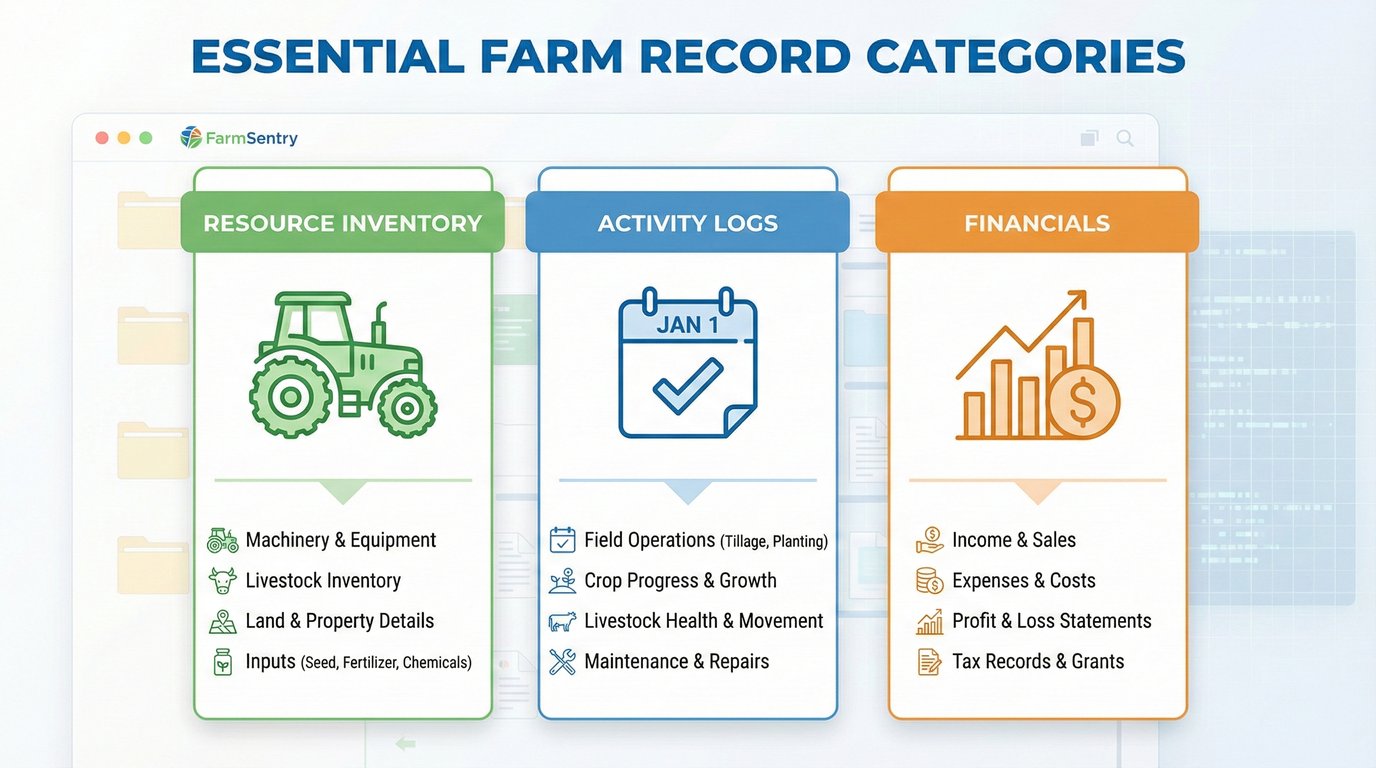
If you are overwhelmed, start by focusing on these three pillars:
1. Resource Inventory
You cannot manage what you don’t track. Create a snapshot of your assets:
Land: Maps, soil types, and ownership status.
Machinery: Make, model, VIN, and maintenance history.
Livestock: Headcounts, ID tags, and location.
2. Activity Logs
This is the daily heartbeat of the farm.
When did you move the herd to Pasture B?
What date did you spray the north field?
Who performed the equipment maintenance?
3. Financial Transactions
Every receipt, invoice, and sale ticket needs a home.
Pro Tip: Don’t just categorize an expense as “Feed.” Break it down by enterprise (e.g., “Feed - Brood Cows” vs. “Feed - Stockers”) to understand which part of your business is consuming cash.
✅ Best Practice: Utilize FarmSentry’s Activity Logging to capture these details in real-time via your smartphone, rather than waiting until the end of the day.
How Do I Transition from Paper to Digital Farm Management?
Transition to digital farm management by starting small with one specific area (like livestock tracking), choosing a cloud-based platform for data security, and utilizing mobile apps to capture data in the field.
The notebook system has a fatal flaw: it is not searchable, it is easily destroyed, and it doesn’t do math for you.
Step 1: Choose Cloud-Based Software
Cloud software saves your data to a secure server, not just your specific device. If you drop your phone in the water trough, your data is safe. You simply log in on a new device.
Step 2: Input Your “Static” Data First
Don’t try to log today’s activities until you have set up the foundation.
Enter your field names/maps.
Upload your animal lists.
List your equipment.
Step 3: Enter Data at the Source
The biggest advantage of digital tools is mobility. Entering data in the tractor cab or the barn is more accurate than trying to remember it at 9:00 PM.
⚠️ Common Mistake: Trying to digitize 20 years of historical paper records immediately. Don’t do this. Start with today’s data and move forward. Only backfill historical data if absolutely necessary for breeding analysis.
When Should I Update My Farm Records?
You should update farm records immediately after an event occurs (planting, calving, sale) to ensure accuracy, or at minimum, reconcile your data weekly to prevent backlogs.
Procrastination is the enemy of accuracy. The longer you wait, the “fuzzier” the details become.
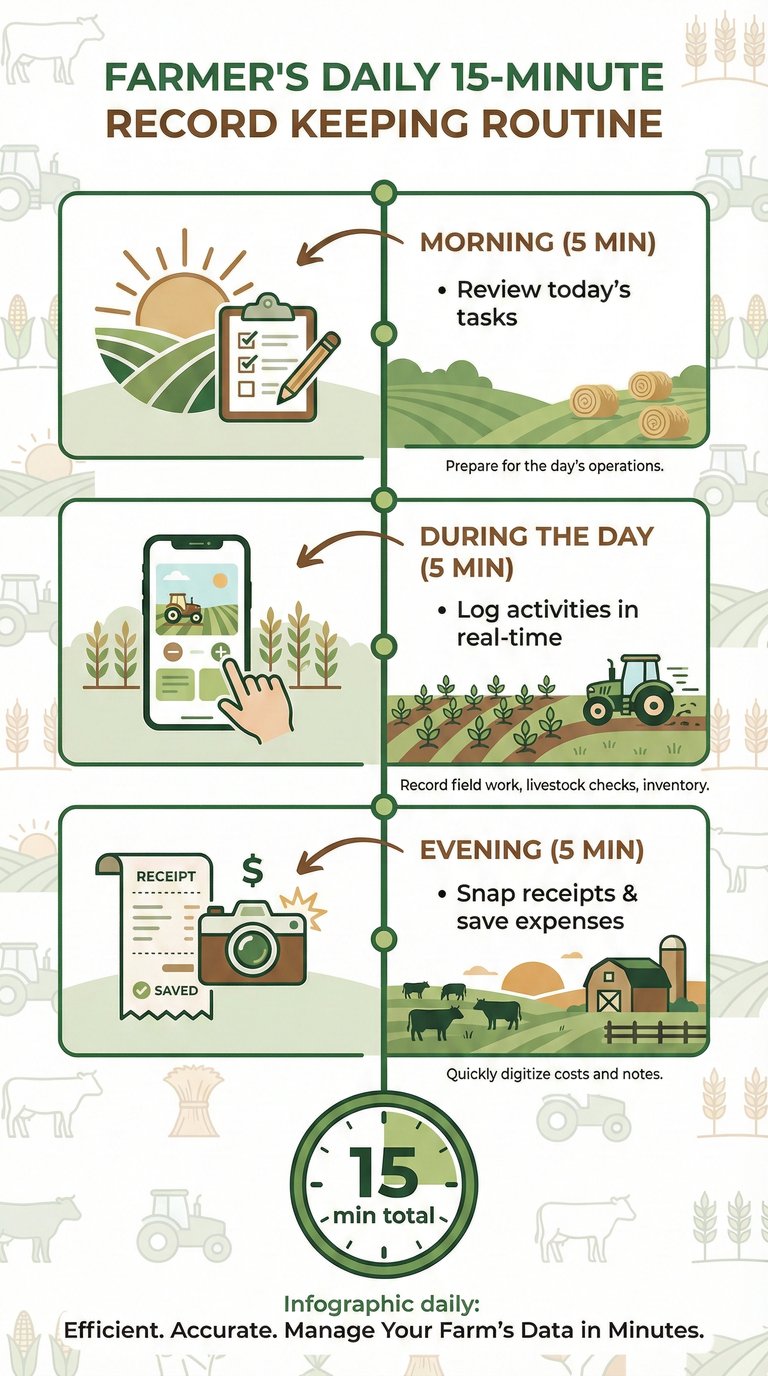
The “15-Minute Rule”
Commit to spending 15 minutes a day on records.
Morning: Check the plan for the day (Review tasks).
During the day: Log activities as they happen using your mobile device.
Evening: Quick review to ensure all expenses/receipts from the day are snapped and saved.
Seasonal Reconciliations
Monthly: Review Financial Reports to check budget vs. actuals.
Quarterly: Inventory check (count bales, verify herd numbers).
Annually: Full tax preparation and profitability analysis.
🔍 Definition: Real-time Data Entry refers to logging information (like a birth or a fuel purchase) at the exact moment it happens, usually via a mobile app, reducing memory errors.